Wedding QR Code Sign Templates
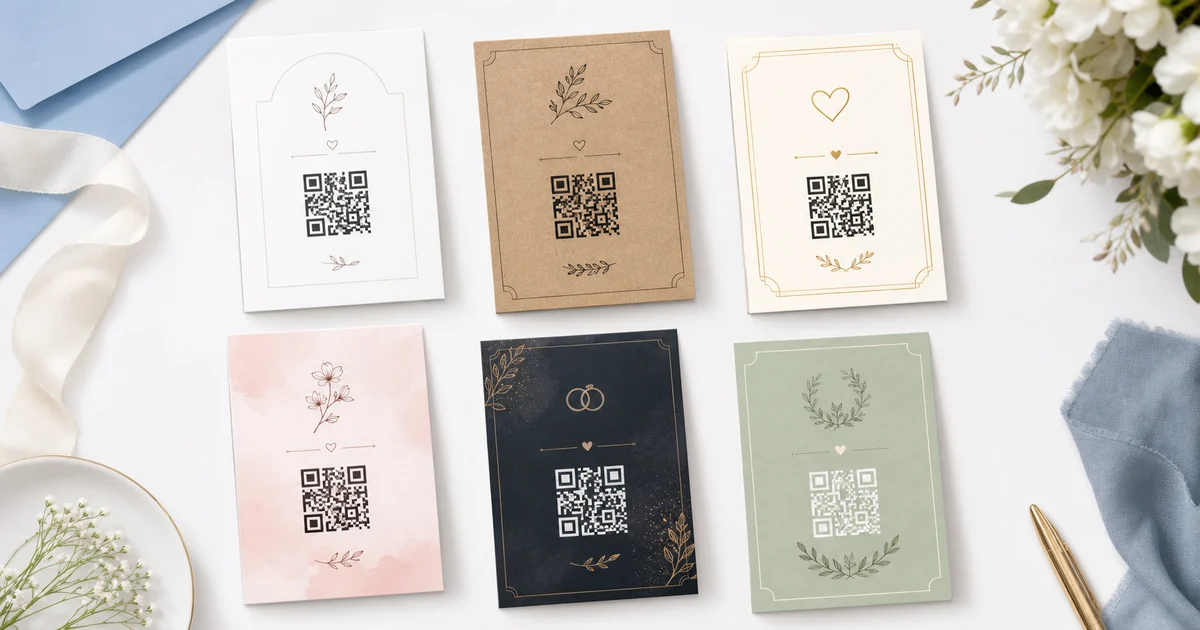
A wedding QR code sign should look intentional, match the room, and tell guests exactly why they should scan. The best signs are clear from several feet away and short enough to read in motion.
Use this guide to choose a sign style, size it for the placement, and pair it with wording that makes guest photo uploads feel easy and welcome.
How It Works
- Choose a style: Match the sign to your wedding design: minimalist, rustic, formal, blush, dark, or botanical.
- Pick the right size: Use small signs for tables and larger frames for entrances, bars, and high-traffic areas.
- Add your QR code: Create a Guest Clicks event and place the QR code in your sign template with a clear no-app message.
Recommended Sign Sizes
- 5x7 inches for table tents, place settings, and small frames.
- 8x10 inches for gift tables, bars, and guest book stations.
- 11x14 inches for welcome tables, easels, and large venues.
- Letter or A4 for quick home printing and backup signs.
Placement Ideas
- Welcome table
- Guests see it as they arrive and understand the photo-sharing plan immediately.
- Bar area
- People pause with phones in hand, making it a natural scan point.
- Dessert table
- Guests already photograph the cake, so the QR code is contextually relevant.
Design Tips
- Keep a white quiet zone around the QR code.
- Avoid busy backgrounds behind the code.
- Test the printed sign from the distance guests will scan.
- Use short copy and make no app needed visible.
Frequently Asked Questions
Where do I get the actual QR code?
Create a Guest Clicks event to get the private upload page and QR code. You can then paste the upload link into the public sign tool to preview the final sign, or download the QR code from your event dashboard.
Do guests need to download an app?
No. Guest Clicks uses browser-based QR code uploads, so guests scan the code and upload from their phone without installing an app or creating an account.
Can I use these ideas in Canva or Etsy templates?
Yes. Use the sizing and wording recommendations with any editable sign design tool or template.
Create the QR code for your sign
Start a free Guest Clicks event, download your QR code, and place it into your chosen wedding sign design.
Create Free EventExplore Guest Clicks
- Home
- Features built for simple guest photo collection
- Pricing for QR code photo sharing
- Why Guest Clicks exists
- Contact Guest Clicks
- Event photo sharing tips and guides
- Guest Clicks help center
- Guest Clicks privacy policy
- Guest Clicks terms of service
- Wedding photo sharing without the friction
- Corporate event photo sharing that attendees actually use
- Birthday photo sharing without chasing guests
- Wedding QR Code Sign Generator
- Disposable Camera Cost Calculator
- QR Code Scan Size Calculator
- Event Photo Sharing Wording Generator
- Guest Clicks vs Google Photos
- Guest Clicks vs WedUploader
- Guest Clicks vs GuestPix
- Guest Clicks vs The Guest
- Disposable Cameras vs QR Code Photo Sharing
- Disposable Camera Alternatives for Events
- Wedding QR Code Sign Templates
- Guest Clicks Facts
- How to Collect Wedding Guest Photos
- Wedding Photo Sharing QR Code
- Wedding Photo Sharing Without an App
- Best Wedding Photo Sharing Apps
- Wedding Guest Photo Upload Link
- Corporate Event Photo Sharing QR Code
- Conference Photo Sharing
- Company Party Photo Sharing
- Event Photo Moderation for Corporate Events
- Internal Event Photo Collection
- Birthday Party Photo Sharing QR Code
- Graduation Party Photo Sharing
- Reunion Photo Sharing
- Baby Shower Photo Sharing
- What Disposable Cameras Really Cost Per Usable Wedding Photo
- Wedding Photo Collection Checklist
- Corporate Event Photo Privacy Checklist
- Google Photos Event Sharing Alternatives
- Wedding Photo Sharing App Alternatives
- Wedding Vendor Photo Resources