Guest Clicks vs Google Photos
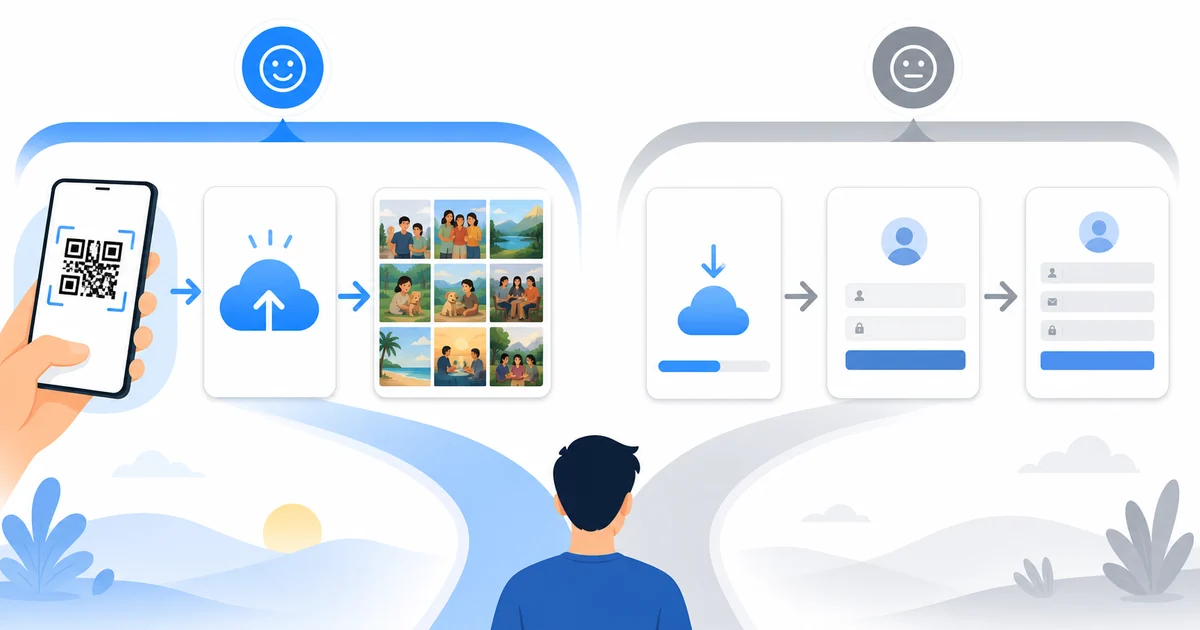
Google Photos is excellent for personal photo storage. Event photo collection has a different problem: getting a mixed group of guests to contribute quickly without app downloads, account friction, or confusion at the venue.
Guest Clicks is built around the in-person event moment. Guests scan a QR code, upload from a browser, and the organizer gets one event-specific gallery with moderation and download controls.
How It Works
- Compare guest friction: Look at what the guest must do before uploading: scan a QR code versus joining a shared album workflow.
- Compare organizer control: Consider moderation, gallery visibility, downloads, and whether photos are event-specific.
- Choose by audience: Small tech-savvy groups may be fine with Google Photos; mixed wedding or conference crowds usually need lower friction.
Where Guest Clicks Is Stronger
- No guest app download or account required.
- Built-in QR code workflow for signs and in-person scanning.
- Moderation before photos become public.
- Event-specific gallery designed for a start and end date.
Where Google Photos Can Still Fit
Google Photos can be the right choice for small groups where everyone already uses Google Photos, has a Google account, and is comfortable joining a shared album. It is less ideal when you need every guest at a large event to participate quickly.
Best Combined Workflow
Some organizers use Guest Clicks for event-day collection and then export or sync approved photos into long-term storage afterward. That separates upload adoption from archival storage.
Frequently Asked Questions
Do guests need to download an app?
No. Guest Clicks uses browser-based QR code uploads, so guests scan the code and upload from their phone without installing an app or creating an account.
Is Google Photos free?
Google Photos shared albums can be free, but storage and account requirements still matter for the organizer and guests.
Can Guest Clicks sync with Google Photos?
Not directly. Organizers can download the whole gallery as a ZIP and then add the photos to Google Photos for long-term storage.
Try the event-first workflow
Create a free event and see what changes when guests do not need to install an app or sign into an account.
Create Free EventExplore Guest Clicks
- Home
- Features built for simple guest photo collection
- Pricing for QR code photo sharing
- Why Guest Clicks exists
- Contact Guest Clicks
- Event photo sharing tips and guides
- Guest Clicks help center
- Guest Clicks privacy policy
- Guest Clicks terms of service
- Wedding photo sharing without the friction
- Corporate event photo sharing that attendees actually use
- Birthday photo sharing without chasing guests
- Wedding QR Code Sign Generator
- Disposable Camera Cost Calculator
- QR Code Scan Size Calculator
- Event Photo Sharing Wording Generator
- Guest Clicks vs Google Photos
- Guest Clicks vs WedUploader
- Guest Clicks vs GuestPix
- Guest Clicks vs The Guest
- Disposable Cameras vs QR Code Photo Sharing
- Disposable Camera Alternatives for Events
- Wedding QR Code Sign Templates
- Guest Clicks Facts
- How to Collect Wedding Guest Photos
- Wedding Photo Sharing QR Code
- Wedding Photo Sharing Without an App
- Best Wedding Photo Sharing Apps
- Wedding Guest Photo Upload Link
- Corporate Event Photo Sharing QR Code
- Conference Photo Sharing
- Company Party Photo Sharing
- Event Photo Moderation for Corporate Events
- Internal Event Photo Collection
- Birthday Party Photo Sharing QR Code
- Graduation Party Photo Sharing
- Reunion Photo Sharing
- Baby Shower Photo Sharing
- What Disposable Cameras Really Cost Per Usable Wedding Photo
- Wedding Photo Collection Checklist
- Corporate Event Photo Privacy Checklist
- Google Photos Event Sharing Alternatives
- Wedding Photo Sharing App Alternatives
- Wedding Vendor Photo Resources